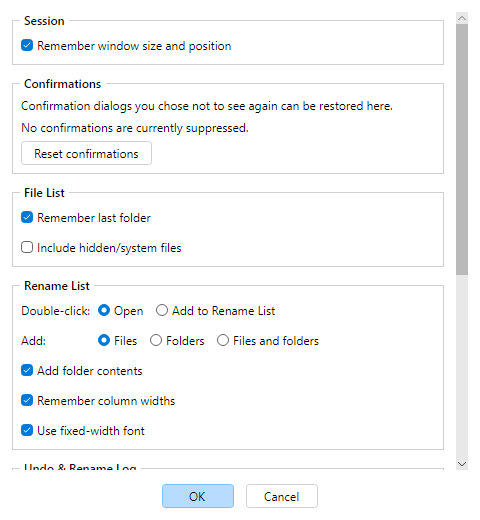
Tools → Options (Ctrl+,) opens preferences
stored in config.json under your AppData finebytes MFR folder. All
settings appear on one scrollable page.
Session, Confirmations & File List
Remember window size and position — restore main window and dialogs.
Confirmations — restore dialogs you previously chose not to see again
(Reset confirmations).
File List: remember last folder; include hidden/system files.
Masks and Exclude masks on the File List still filter what gets
added.
Rename List
Double-click in File List: Open vs Add to Rename List.
Add: files, folders, or both; optional
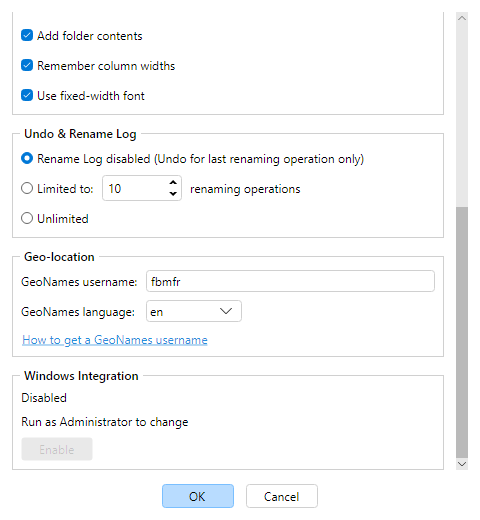
Add folder contents (recurse); remember column widths;
Use fixed-width font.
Undo & Rename Log
Rename Log can be disabled (Undo Last only), limited to N operations, or unlimited. History
is used by the Rename Log dialog and
Undo Last.
Location
GeoNames username for GPS place names (leave blank for the built-in account) and language for
nearby names (defaults to English, en; pick a suggestion or type any
ISO 639-1 code).
Windows Integration
Shows whether Rename with MFR 8 is on the Explorer right-click menu,
with Enable / Disable to change it
immediately (requires Run as Administrator; see
System Requirements).
Tools → Reset Configuration deletes preferences and restarts — see
Reset configuration.