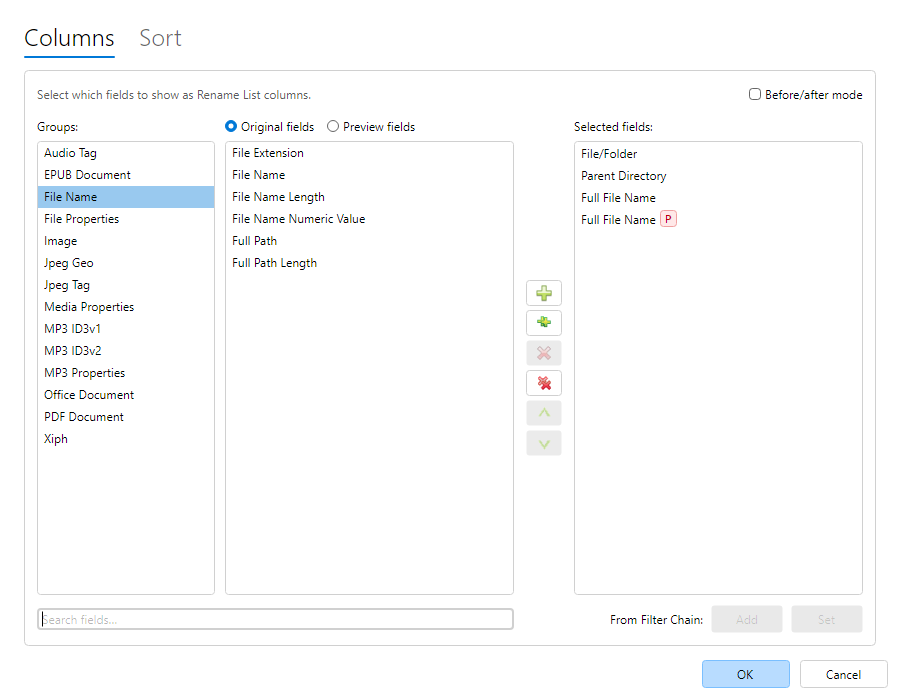
Select fields… chooses which columns appear in the
Rename List and configures Auto-Sort. Open it from the Rename List
toolbar, menu, grid context menu, or a column-header menu. On either tab, use
Search fields… to find fields across all groups (Groups list is
disabled while searching with no group highlighted; each hit shows its group name). Clear the
box (or use its clear button) to return to group browse. The search box is shared between
Columns and Sort.
Columns tab — Available fields (by group) and Selected fields. Add/remove with
buttons or double-click; reorder with Up/Down. Unlimited columns are allowed.
Before/after mode — when enabled, the stored layout is originals-only; use the
Rename List Before/After toggle (Ctrl+[ /
Ctrl+]) to flip between original and preview values for the same
fields.
Without Before/after mode, you can still include dedicated preview columns for writable
fields. Preview headers use distinctive styling; changed cells highlight in the grid.
Add columns from filters / Set columns from filters infer
columns from the current Filter Chain (write targets and format tokens).
Sort tab — multi-field Auto-Sort (same as
Auto-Sort). Select sort fields… opens
this dialog on the Sort tab.
Hide a single column from a header context menu (Hide field).