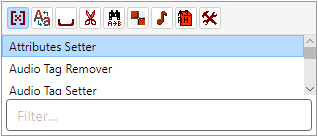
Available Filters lists every filter you can add to the
Filter Chain for items in the
Rename List.
Filters are grouped (Case, Space, Trimming, Replace, Formatting, Audio, Attributes, Misc).
Use the group toolbar icons; the left-most control shows all filters alphabetically.
Double-click a filter, press Enter, or choose Filters → Add selected filter
to append it to the Filter Chain.
Selecting a palette filter shows a short description in
Filter Configuration until a chain step is selected.