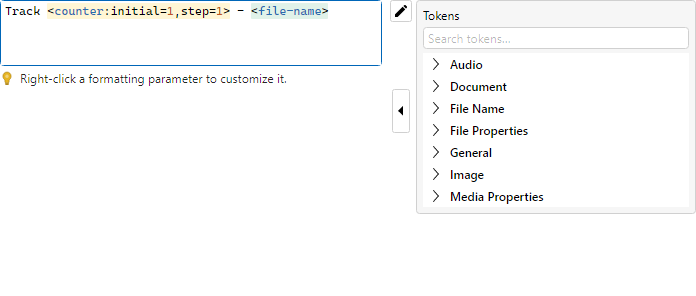
The Format Editor appears in filters that build text from a pattern (format string), such as
Formatter, Replacer, and
Audio Tag Setter.
A format string mixes constant text with formatting tokens of the form
<name:param1,param2,…>. Tokens always produce text (dates and numbers are
converted).
Tokens use the current preview values for each Rename List item — earlier Filter Chain steps
are visible to later tokens.
If a token cannot extract data for an item (for example an image token on a non-image),
preview fails for that item and GO skips it.
Valid tokens are highlighted in the editor. Use the insert menu (or Insert pane) to add a
token at the caret — type in Search tokens… to filter the catalog
across groups (results show each token’s group path; clear the box or use its clear button to
restore the grouped list). Then open the token editor (toolbar or right-click) to configure
parameters.
Double-click a token in the format string to select the whole token.
Drag a Rename List cell onto the field to insert that cell’s display text at the caret, or
drop a file from Explorer to insert its path. Read-only fields ignore drops.