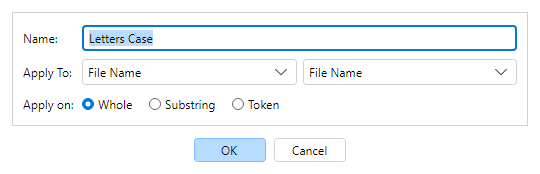
Filter Options configures general settings for the selected
Filter Chain step: display name, Apply To target, and
(for text targets) where the filter runs.
Open from the Filter Chain toolbar / context menu, or
Filters → Filter options, when exactly one step is selected.
Most filters can target writable text fields (file name, path parts, audio tags, and more).
Some filters (for example Audio Tag Setter) use a fixed
target.
Apply To uses a field group combo and a field combo. Only changeable text fields are listed.
Scope:
Whole — entire field text.
Substring — a start/end character range.
Token — one part after splitting on a separator (for example
- in Artist-Song).