Magic File Renamer Help


Unlocking Pro

MFR 8 starts with a Free license. Unlock Pro on this computer when you need more.

Free vs Pro

Free Pro
Items per rename (GO) in the MFR GUI Up to 20 Unlimited
Items per rename in mfrc Unlimited Unlimited
Preview, filters, Undo, rename scripts Unlimited Unlimited
Price Free $30 (one computer)

Already licensed for an older version?

How to unlock Pro

  1. If you do not have a license yet, buy Pro on Unlock Pro ($30 for one computer), or use the upgrade path above when you already have an older seat.
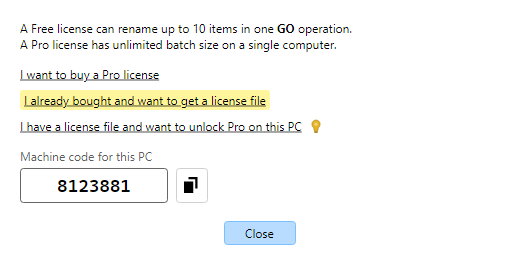
  2. In MFR, choose Help → Unlock Pro…, then I already bought and want to get a license file. That opens Activate Magic File Renamer 8. Type the email you used for the order. The page already shows this PC’s machine code (it starts with 8).
    Unlock Pro dialog with the Activate license file link highlighted
    Unlock Pro - get a license file.
  3. Wait for the license email (check spam if it is slow).
  4. Save the mfr8.license.txt attachment somewhere you can find it (for example Downloads or Documents).
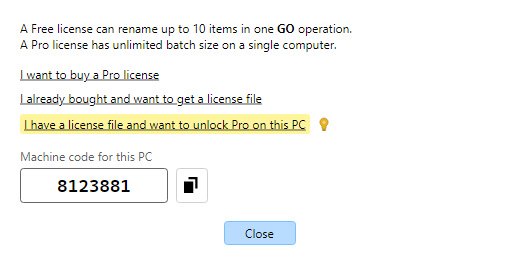
  5. In MFR, choose Help → Unlock Pro…, then I have a license file and want to unlock Pro on this PC. Open the file you saved. If it is valid, Pro unlocks right away. About and the status bar show Pro.
    Unlock Pro dialog with the open license file link highlighted
    Unlock Pro - open the license file.
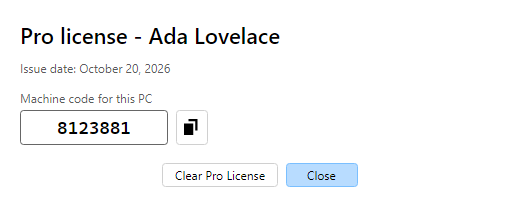
  6. After Pro is unlocked, the same window is Help → License Information…. It shows your Pro details, issue date, and this PC’s machine code.
    License Information dialog showing Pro license name, issue date, and machine code
    License Information - Pro details.

Tips