Magic File Renamer Help
Counter
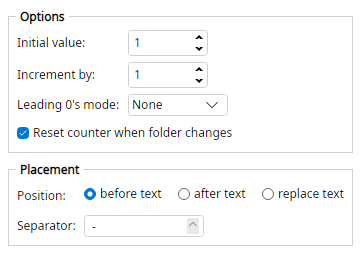 Filter options.
Builds a number from each item's position in the Rename List.
- The counter can run through the whole list or reset in each folder.
- Position may be before, after, or replace the selected text.
Options
- Initial value: - Number used for the first file.
- Increment by: - Added for each next file. May be negative.
- Leading 0's mode: - None (no padding), Automatic (one width for the whole list or folder), or Custom (pad to Total length).
- Total length: - Minimum digit count when Leading 0's mode is Custom.
- Reset counter when folder changes - When checked, numbering restarts in each folder. When unchecked, the whole Rename List shares one counter.
- Position: - before text, after text, or replace text.
- Separator: - Text between the counter and the original name (before or after only).
Examples
Initial value1
Increment by1
Leading 0's modeCustom
Total length3
Positionreplace text
List item5th → 005
Intro >>> 005
Initial value0
Increment by1
Positionbefore text
Separator_
List item3rd → 2
Holes >>> 2_Holes
Initial value0
Increment by1
Positionafter text
Separator-
List item2nd → 1
Holes >>> Holes-1